

Few things are more frustrating than trying to enjoy the comfort of a humidifier only to be distracted by unexpected noises. Humidifiers are designed to quietly add moisture to the air, helping relieve dry skin, irritated sinuses, cough, and other respiratory discomforts.
However, when a humidifier starts making gurgling, buzzing, rattling, or whistling sounds, it can be a sign that something isn’t working properly.
Understanding why your humidifier is making noise can help you identify potential problems, maintain the device correctly, and ensure it continues to operate safely and efficiently in your home.

Download our free guide that has over 100+ of the best tips for healthy lungs.
Why is My Humidifier Making Noise?
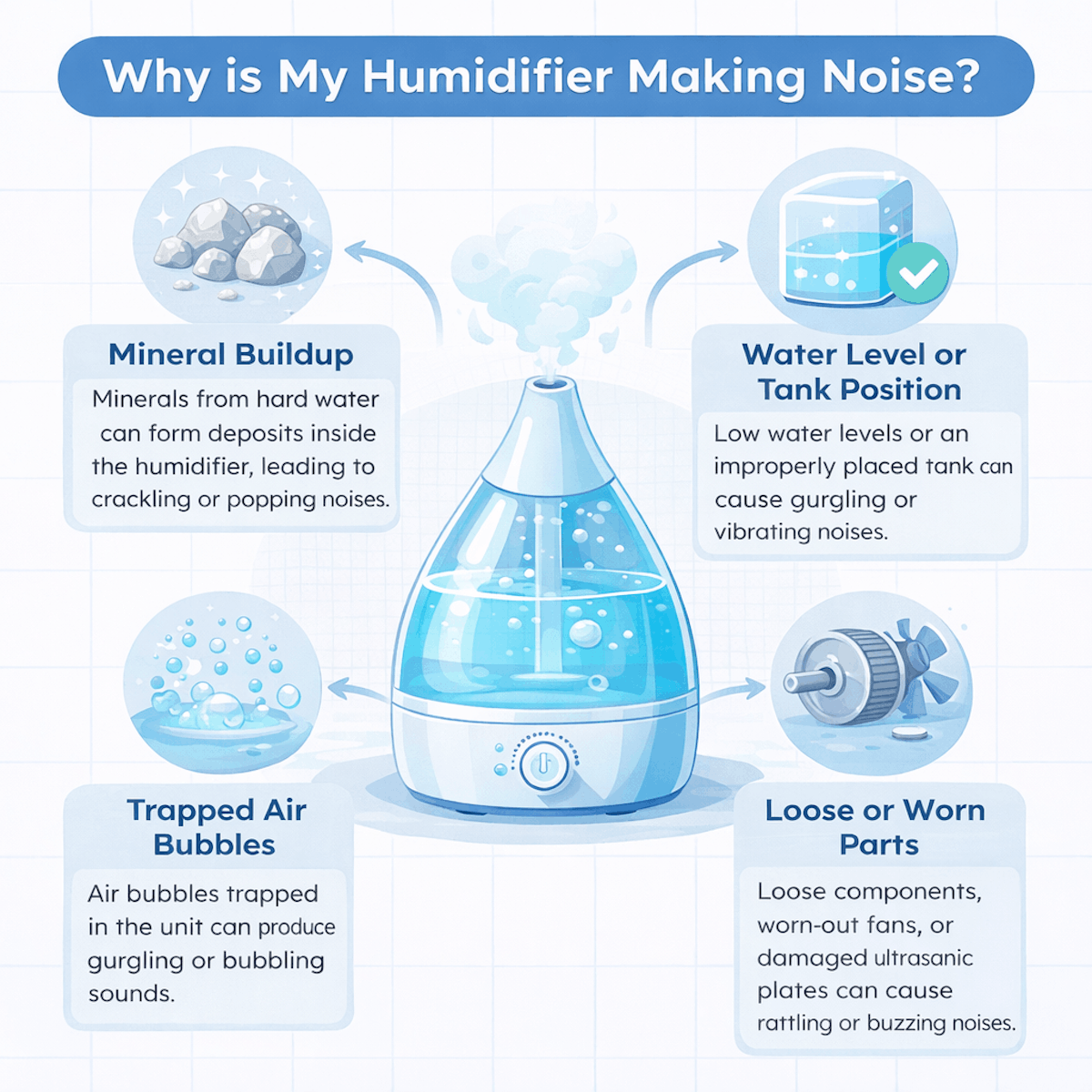
A humidifier may make noise for several common reasons, most of which are related to normal operation or minor maintenance issues. Mineral buildup from hard water can cause humming, crackling, or popping sounds as deposits form on internal components. Low water levels or an improperly seated tank may create gurgling or vibrating noises.
Air bubbles trapped in the system can also produce unusual sounds as water circulates through the unit. In some cases, loose parts, worn-out fans, or aging ultrasonic plates can lead to rattling or buzzing. Regular cleaning, using distilled water, and ensuring all components are properly assembled can often reduce noise and help your humidifier operate more quietly and efficiently.
Common Reasons Humidifiers Make Noise
Humidifiers create sound through moving parts, airflow, and water movement. The type and condition of your unit often determine whether the noise stays subtle or becomes distracting.
Mechanical Vibrations
Mechanical vibrations often come from loose or worn internal parts. You may hear rattling, buzzing, or a low hum when the motor, housing, or base does not sit firmly. Placement matters. When you set the humidifier on an uneven or hollow surface, vibrations transfer into the table or floor and amplify the sound. Thin furniture and nightstands make this more noticeable.
Check for loose screws, misaligned covers, or cracked plastic panels. Even minor gaps can create noise during operation. Regular handling, refilling, and cleaning can gradually loosen components, especially in older units.
Fan Operation
Many humidifiers rely on a fan to move air through the mist or evaporative filter. You usually hear a steady whirring or airflow sound when the fan runs. Fan noise increases at higher output settings. When you select maximum humidity or boost mode, the fan spins faster and pushes more air, which naturally raises the sound level.
Dust buildup also affects noise. When debris collects on the fan blades or intake vents, the fan works harder and loses balance. This can create uneven airflow and a rougher sound instead of a smooth, consistent hum.
Water Bubbling
Bubbling sounds occur as water moves from the tank into the base. Gravity-fed designs release air and water in cycles, which creates gurgling or glugging noises. You notice this most after refilling the tank. As pressure equalizes, trapped air escapes through the water valve, producing brief but noticeable sounds.
Improper tank seating can worsen bubbling. If the tank does not sit flat on the base, water flow becomes irregular. This leads to repeated bubbling instead of short, occasional noises during normal operation.
Mineral Build-Up
Mineral deposits form when you use tap water with high mineral content. Over time, scale collects on heating elements, ultrasonic plates, and water channels. These deposits interfere with normal operation. You may hear crackling, hissing, or high-pitched sounds as the unit struggles to heat or vibrate water efficiently.
Build-up also restricts water flow. When water passes through narrowed paths, it creates extra noise and uneven mist output. Regular cleaning and using distilled water reduce mineral accumulation and help keep sound levels consistent.
Identifying the Type of Noise
Different humidifier noises point to specific mechanical or airflow issues. By matching the sound you hear to its source, you can narrow down whether the cause involves moving parts, water flow, or vibration.
Clicking Sounds
Clicking usually comes from internal parts that move in short, repeated motions. You often hear it when the unit starts, shuts off, or switches mist output levels. A common cause involves a loose fan blade or impeller. As the motor turns, the part strikes nearby housing or shifts slightly. Mineral buildup on moving components can also create uneven motion that produces clicking.
Check whether the water tank sits fully in place. A misaligned tank can press against internal switches, causing repeated clicking as the unit senses incorrect positioning. If clicking increases over time, inspect for worn plastic gears. These parts can degrade and lose smooth contact, especially in older evaporative or ultrasonic models.
Humming or Buzzing
A steady hum or buzz often comes from the motor or ultrasonic transducer. This sound usually stays constant while the humidifier runs. Low water levels commonly trigger louder buzzing. When the tank runs dry, the motor or transducer works harder, which increases vibration and noise. Filling the tank often reduces the sound right away.
Electrical issues can also cause buzzing. A loose power connection or failing internal component may produce a low electrical hum that persists regardless of water level. If the sound changes pitch when you adjust mist settings, the motor likely causes it. Consistent, non-changing buzzing may point to internal wear.
Gurgling or Dripping
Gurgling sounds come from water moving through internal channels. You often hear this noise right after filling the tank or when the humidifier cycles water into the base. Air trapped in the tank can cause uneven water flow. As air bubbles escape, water rushes in and creates a gurgling or glugging sound. This usually fades after a few minutes.
Dripping noises may indicate excess condensation inside the unit. Cool mist models can collect water on internal surfaces, which then drips back into the reservoir. Make sure you place the humidifier on a level surface. Tilting can disrupt water flow and increase gurgling or dripping sounds.
Rattling or Shaking
Rattling or shaking usually signals instability or loose components. You may notice the noise gets louder as mist output increases or when the fan speed changes. Check the surface under the humidifier. Uneven floors or lightweight furniture can amplify vibration, making normal operation sound much louder.
Internal parts can also loosen over time. A slightly detached fan cover or housing panel can vibrate against the body during operation. If rattling occurs only at certain settings, airflow likely causes it. Higher fan speeds can push air against loose parts, creating repeated shaking sounds.
Troubleshooting Unusual Humidifier Noises
Unusual humidifier noises often come from water issues, moving parts, or worn components. You can identify most causes by checking fluid levels, inspecting internal motion, and examining sealing surfaces.
Checking Water Levels
Low or inconsistent water levels often cause gurgling, sputtering, or popping sounds. When the tank runs low, the unit may pull in air along with water, which creates uneven flow and noise. Fill the tank to the manufacturer’s recommended level and reseat it firmly on the base.
Overfilling can also cause problems. Excess water may leak into areas not designed to stay wet, leading to sloshing or vibrating sounds. Check for proper tank alignment and make sure the float moves freely.
Watch for mineral buildup inside the tank or base. Hard water deposits restrict flow and force the humidifier to work harder, which increases noise. Clean the tank with a mild vinegar solution and rinse it thoroughly before use.
Inspecting the Fan Blade
A noisy fan usually produces rattling, humming, or buzzing sounds. Unplug the unit and remove the housing to access the fan blade. Dust, pet hair, and mineral residue often collect on the blade and throw it off balance.
Spin the blade gently by hand. It should move smoothly without wobbling or resistance. If it catches or scrapes, debris or misalignment likely causes the noise. Clean the blade with a soft brush or cloth and avoid bending it.
Check for loose screws or mounting clips near the fan assembly. Even slight movement can create vibration during operation. Tighten fasteners carefully and confirm that the fan sits squarely in its bracket.
Examining Seals and Gaskets
Worn or damaged seals often cause whistling, hissing, or vibrating sounds. These noises occur when air or water escapes through gaps instead of flowing through intended channels. Inspect rubber gaskets around the tank, base, and mist outlet.
Look for cracks, flattening, or stiffness. Flexible seals create a tight fit and reduce vibration. If a gasket feels brittle or misshapen, replace it with a compatible part from the manufacturer.
Clean sealing surfaces before reassembly. Residue and mineral scale prevent proper contact and increase noise. Press components together evenly and avoid forcing them, since uneven pressure can worsen leaks and vibration.
Impact of Placement and Surroundings
Where you place your humidifier often determines how loud it sounds during normal operation. The surface beneath it, the room’s sound behavior, and nearby obstacles can all amplify or reduce noise.
Surface Stability
An unstable surface turns minor vibrations into noticeable noise. When you place a humidifier on a thin table, shelf, or uneven floor, the surface can resonate and create rattling or humming sounds.
Choose a flat, solid surface such as a nightstand or low dresser. Avoid placing it near edges where movement increases. If the unit still vibrates, place a dense rubber mat or folded towel underneath to absorb motion.
Lightweight furniture can also flex under the humidifier’s weight, especially as the water tank empties. That flexing often causes intermittent clicking or buzzing. A stable base keeps the internal fan and motor from transferring vibration into the room.
Room Acoustics
Room size and materials affect how humidifier noise travels. Small rooms with hard surfaces reflect sound, making even a quiet unit seem louder. Bathrooms, kitchens, and rooms with tile or hardwood floors tend to echo. Soft materials like carpet, curtains, and bedding absorb sound and reduce perceived noise.
Ceiling height also matters. Low ceilings trap sound waves and concentrate noise around you, especially at night. If the humidifier sounds louder than expected, try moving it to a room with more sound-absorbing materials or adding soft furnishings nearby. These changes do not alter the machine itself but can noticeably lower how loud it feels.
Proximity to Walls or Objects
Placing a humidifier too close to walls or furniture can increase noise through reflection and vibration. Sound waves bounce off hard surfaces and return toward you, which makes the unit seem louder. Keep at least 12–24 inches of clearance on all sides. This spacing allows airflow to move freely and prevents sound from concentrating in one area.
Avoid placing the humidifier between large objects, such as a bed and a wall. That narrow gap can trap sound and amplify motor or fan noise. Nearby objects can also vibrate in response, causing secondary buzzing or rattling that seems like a mechanical problem when placement causes it.
Humidifier Maintenance for Noise Prevention
Routine maintenance reduces rattling, humming, and gurgling by keeping moving parts clean and water flow steady. Consistent care also prevents mineral buildup and worn components from amplifying normal operating sounds.
Regular Cleaning Routines
You should clean your humidifier every three to seven days, depending on use and water hardness. Empty the tank daily, then wipe it dry to prevent biofilm that can cause buzzing or sloshing sounds. Disassemble removable parts and wash them with warm water and mild dish soap. Focus on the base, float, and mist outlet, since debris in these areas often triggers vibration.
For deeper cleaning, use white vinegar to loosen mineral deposits. Fill the tank with vinegar, let it soak for 20–30 minutes, then rinse thoroughly. Avoid abrasive brushes, which can scratch plastic and create new noise points.
Note: Before reassembly, check that all parts seat firmly. Loose components often cause rattling when the fan or ultrasonic plate runs.
Replacing Filters
If your humidifier uses a wick or cartridge filter, replace it on the schedule set by the manufacturer. A clogged filter restricts airflow or water flow, which forces the unit to work harder and produce louder noise. Inspect filters weekly for stiffness, discoloration, or mineral crust. These signs indicate reduced absorption and uneven operation.
Use only compatible replacement filters. Incorrect sizes can shift during operation and cause tapping or grinding sounds. After installing a new filter, run the unit for a few minutes and listen closely. Stable, low-level sound indicates proper seating, while sudden changes suggest misalignment.
Descaling Techniques
Mineral scale often causes humming, clicking, or high-pitched noise, especially in ultrasonic humidifiers. You should descale at least once a month if you use tap water. Unplug the unit and drain all water. Apply white vinegar or a manufacturer-approved descaler directly to scaled surfaces, including the ultrasonic membrane or heating element.
Let the solution sit for the recommended time, then gently wipe with a soft cloth. Rinse several times to remove residue, since leftover acid can damage seals and increase noise. Use distilled or demineralized water afterward. This step slows future scale buildup and helps keep operating sounds consistent.
FAQs About Why Your Humidifier is Making Noise
What Are the Common Causes of Humidifier Noise?
Common causes of humidifier noise include mineral buildup from hard water, low water levels, trapped air bubbles, and loose or worn internal components. Ultrasonic humidifiers may produce buzzing or vibrating sounds if the ultrasonic plate becomes dirty or damaged.
Evaporative models can create rattling or humming noises if the fan motor is worn or obstructed. Improper tank placement or an uneven surface can also lead to gurgling or vibrating sounds. Regular cleaning, using distilled water, and ensuring proper assembly can help reduce unwanted noise.
How Do I Get My Humidifier to Stop Making Noise?
To reduce humidifier noise, start by cleaning the unit thoroughly to remove mineral deposits, mold, or debris that can interfere with operation. Use distilled or demineralized water to prevent buildup from hard water. Make sure the water tank is properly seated and filled to the recommended level.
Place the humidifier on a flat, stable surface to prevent vibrations. Check for loose parts, worn filters, or damaged components that may need replacement. Performing routine maintenance often helps restore quiet and efficient operation.
Is Some Humidifier Noise Normal?
Yes, some level of noise is normal depending on the type of humidifier you are using. Evaporative humidifiers typically produce a low humming or fan noise, while ultrasonic models may create a soft buzzing or vibrating sound as they generate mist. Steam vaporizers can produce occasional bubbling or boiling sounds.
However, loud rattling, squealing, or sudden changes in noise levels may indicate maintenance issues or mechanical problems. Monitoring your humidifier’s normal operating sound can help you recognize when something may be wrong.
What Does It Mean When My Humidifier Squeals?
A squealing humidifier often indicates a problem with moving parts, such as a worn-out fan motor, loose bearings, or internal friction. This sound can develop over time as components age or become clogged with dust, mineral deposits, or debris.
In some cases, improper assembly or misaligned parts may also cause squealing noises. Cleaning the unit and inspecting internal components may resolve the issue. If the squealing persists, replacing worn parts or the entire humidifier may be necessary to prevent further damage.
Why Is My Humidifier Making a Bubbling Noise?
A bubbling or gurgling noise often occurs when water is moving through the humidifier’s internal system or when air bubbles are trapped inside the tank or reservoir. This sound can happen when the water level is too low, the tank is not properly seated, or the unit is refilling water during operation.
In steam vaporizers, bubbling can also result from the heating process. While mild bubbling is often normal, persistent or loud gurgling may indicate a need for cleaning or adjusting the water tank placement.
Can I Use Bleach to Clean My Humidifier?
Bleach can be used to disinfect a humidifier, but it must be used carefully and in proper dilution. Typically, a small amount of bleach mixed with water can help kill mold, bacteria, and other microorganisms inside the tank and internal components.
After cleaning, the unit must be thoroughly rinsed multiple times to remove any bleach residue, which can be harmful if inhaled. Many manufacturers also recommend vinegar as a safer alternative for removing mineral deposits and routine maintenance.
How Do I Fix a Noisy Humidifier Fan?
To fix a noisy humidifier fan, begin by unplugging the unit and inspecting the fan area for dust, debris, or obstructions. Cleaning the fan blades and surrounding components can reduce friction and noise. Ensure that the fan is properly aligned and securely attached.
If the fan motor or bearings are worn, lubrication or replacement may be required, depending on the model. Replacing dirty or clogged filters can also improve airflow and reduce strain on the fan, helping restore quieter operation.
What Are Signs of a Bad Humidifier?
Signs of a failing humidifier include unusual or loud noises, reduced mist output, persistent foul odors, visible mold or mineral buildup, and water leaks. A humidifier that frequently shuts off, struggles to maintain humidity levels, or requires constant repairs may also be nearing the end of its lifespan.
Poor air quality or respiratory irritation despite using the device can indicate contamination or malfunction. Regular inspection and maintenance can help identify problems early and prevent potential health or safety risks.
When Should You Throw Away a Humidifier?
You should consider replacing a humidifier if it has significant mechanical damage, persistent mold contamination, recurring leaks, or reduced performance despite regular cleaning and maintenance. Most humidifiers last between three to five years, depending on usage and care.
If replacement parts are unavailable or repairs become more expensive than purchasing a new unit, replacement is usually the better option. Continuing to use a damaged or contaminated humidifier can reduce air quality and potentially introduce harmful microorganisms into your environment.
Final Thoughts
In most cases, a noisy humidifier is not a cause for alarm but rather a sign that the unit needs routine maintenance or minor adjustments. Identifying the source of the noise, whether it’s mineral buildup, low water levels, trapped air, or worn components, can help restore quiet operation and extend the life of the device.
Regular cleaning, proper placement, and using the recommended type of water can prevent many common issues.
By understanding how your humidifier works and addressing unusual sounds promptly, you can continue to enjoy the benefits of improved indoor air moisture while maintaining a comfortable and peaceful environment in your home.

Written by:
John Landry is a registered respiratory therapist from Memphis, TN, and has a bachelor's degree in kinesiology. He enjoys using evidence-based research to help others breathe easier and live a healthier life.
References
- Byber K, Radtke T, Norbäck D, Hitzke C, Imo D, Schwenkglenks M, Puhan MA, Dressel H, Mutsch M. Humidification of indoor air for preventing or reducing dryness symptoms or upper respiratory infections in educational settings and at the workplace. Cochrane Database Syst Rev. 2021.